Excel Objects
Every object in the workbook, in one list.
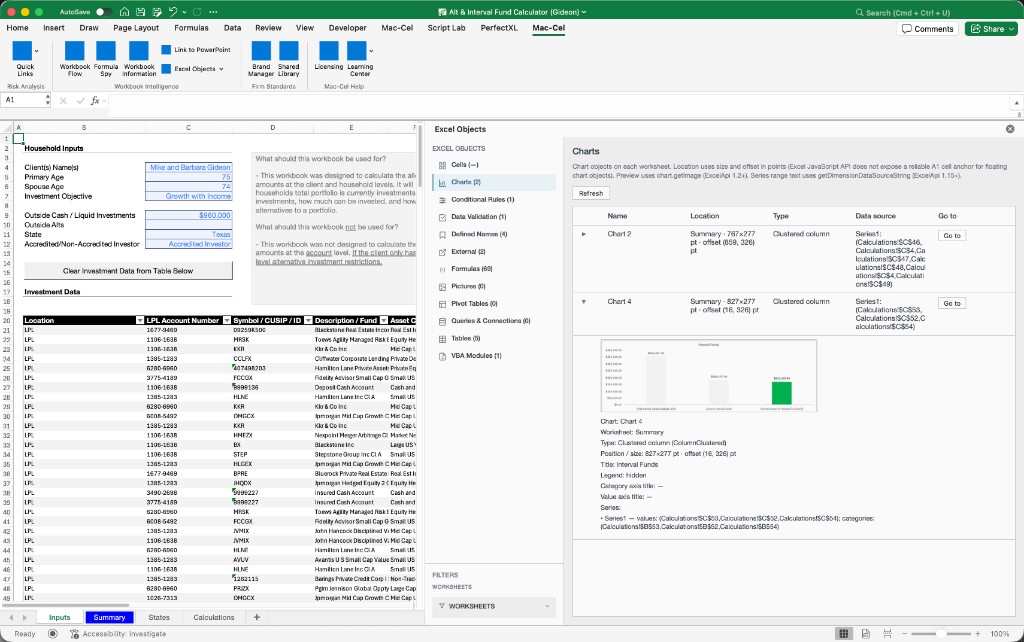
Excel Objects catalogs what's in the file — tables, defined names, pivots, charts, conditional formatting, data validation, pictures, external sources, queries, and VBA modules — with counts, metadata, and a jump to each one.
The problem
Objects accumulate where no one is looking.
Defined names, pivots, conditional formatting, and VBA modules sit outside the cell grid. Without a catalog, you discover them when something breaks — or when a reviewer asks a question you cannot answer from the formula bar.
What it does
Unified catalog
Twelve object types in one list: tables, defined names, pivots, charts, conditional formatting, data validation, pictures, external sources, queries, VBA modules, and related workbook objects.
Counts and metadata
Per-type counts and metadata so you can see what is in the file before you open each object.
Jump to any object
Move from the catalog straight to the object in the workbook.
Object References pane
See which formulas reference a given table, name, pivot, or external source.
Object catalog · example inventory
- Tables14
- Defined names47
- Pivots3
- Charts8
- Conditional formatting22
- Data validation11
- Pictures5
- External sources2
- Queries4
- VBA modules1
What Mac-Cel doesn't claim
- Excel Objects is for finding and understanding, not editing.
- You can't rename or delete objects from the pane.
- VBA modules are listed and previewed rather than edited.
- Power Query details are summarized rather than reproduced in full.
Who it's for
- Analysts inventorying what a handoff file actually contains.
- Reviewers who need to know which pivots, names, and external sources are in play.
- Anyone who has hunted for a defined name across Name Manager by hand.