Firm Standards
Your firm's standards, enforced where decks get made.
Publish brand standards once. Check PowerPoint decks against them, insert approved charts and tables from a shared library, and keep Excel exhibits linked to the slides that show them.
PowerPoint
Deck CheckLayer 1
Scan a deck against your firm's published standards.
Findings cover off-brand fonts, color bindings, hardcoded colors that happen to match, distorted images, logo presence, and unapproved masters or layouts. Fonts and image distortion can be fixed in one click at finding, slide, or whole-deck scope. Colors, logos, and layouts are reported rather than auto-corrected.
Excel and PowerPoint
Brand Manager
Define and publish firm standards — colors, fonts, number and cell formatting, logos, approved PowerPoint masters and layouts — and sync the active profile to everyone's add-in.
Export an Office theme (.thmx) your team can apply through Excel's own theme browser. Mac-Cel does not apply a theme into an open workbook in one click.
Excel and PowerPoint
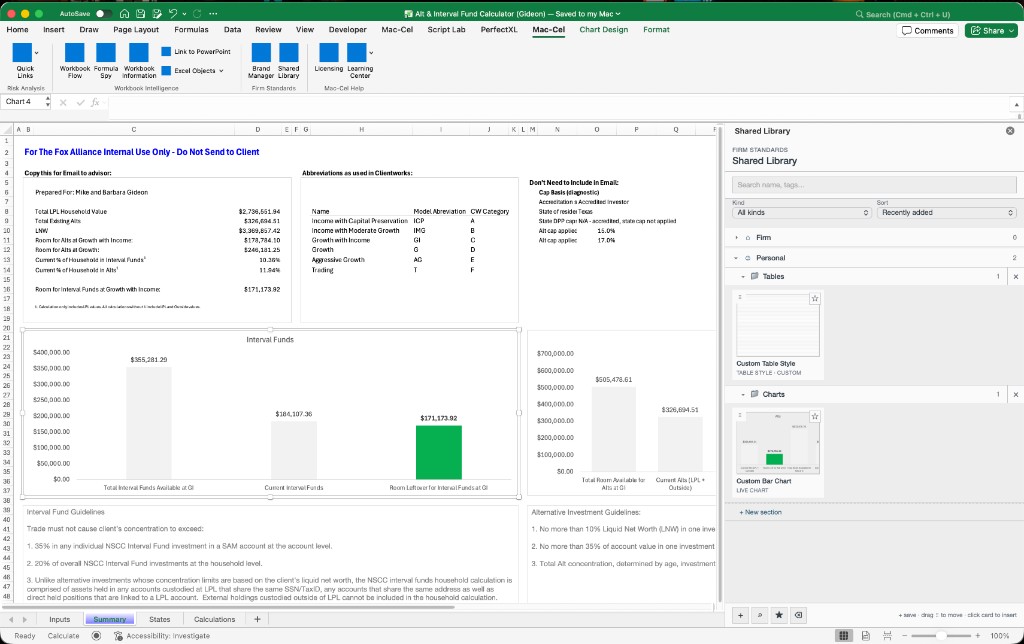
Shared Library
Firm and personal libraries for chart styles, chart images, table styles, and pictures.
Insert live chart and table styles in Excel; insert pictures in Excel and PowerPoint. Chart capture fidelity has limits.
Excel → PowerPoint
Link to PowerPoint
Link Excel ranges, tables, and charts into PowerPoint as refreshable pictures, and update them from the saved workbook when the numbers change.
The source workbook must be saved. Links are pictures rather than live embedded Excel objects. Refreshing may not preserve slide animations or z-order.
What Mac-Cel doesn't claim
- Firm Standards is strongest in PowerPoint today.
- Excel-side brand checking is a lightweight font check, not a full compliance scan.
- Mac-Cel does not apply a theme into an open workbook.