Formula Spy
Read any formula, however nested.
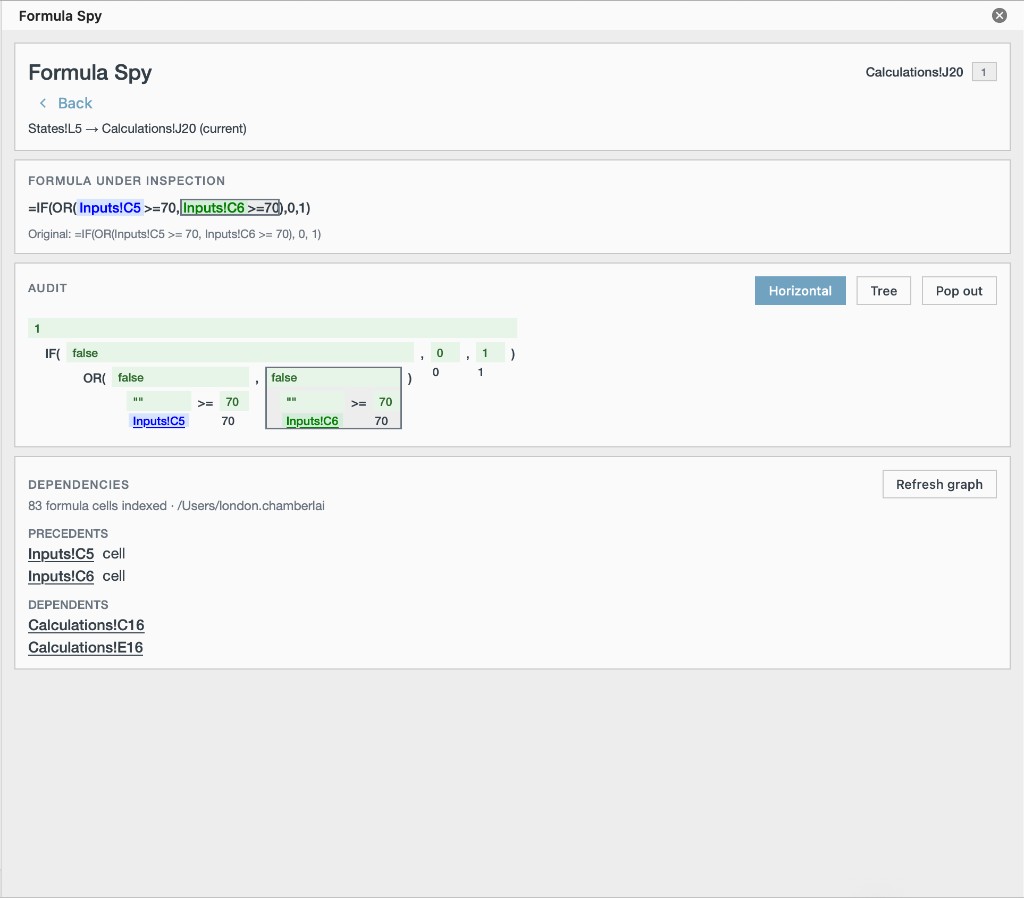
Formula Spy parses the selected cell into a live tree, traces what feeds it and what depends on it, and evaluates sub-expressions in place.
The problem
The formula bar stops at the surface.
Nested INDEX/MATCH constructions, cross-sheet references, and structured table refs do not fit in a single glance. You need the tree, the lineage, and the evaluated pieces — without jumping sheets for every operand.
What it does
Tree and outline views
The formula is parsed into a tree and rendered as a bracketed horizontal tree or a structured outline. Color-cycled references link the flat formula to its parsed structure.
Nested lineage
Expand a reference to pull in the formula behind it, several levels deep, without jumping between sheets.
Precedents and dependents
See what feeds the selected cell and what would break if it changed, across sheets and structured table references.
Step-by-step evaluation
Evaluate any sub-expression inside the pane and see its result, without staging a scratch cell.
Circular reference detection
Cycles in the formula dependency graph are surfaced while you inspect.
Jump to cell
Move from any reference straight to its location.
What Mac-Cel doesn't claim
- Formula Spy reads formulas; it does not rewrite them.
- There is no plain-English narration and no AI — the parsing is deterministic.
- Named ranges are identified but not fully resolved during evaluation.
- Very large models may take a moment to build the full dependency graph.
Who it's for
- Analysts inheriting deal models who need to read nested formulas in place.
- Reviewers who trace precedents and dependents before signing off.
- Anyone who has staged a scratch cell just to see what a sub-expression returns.